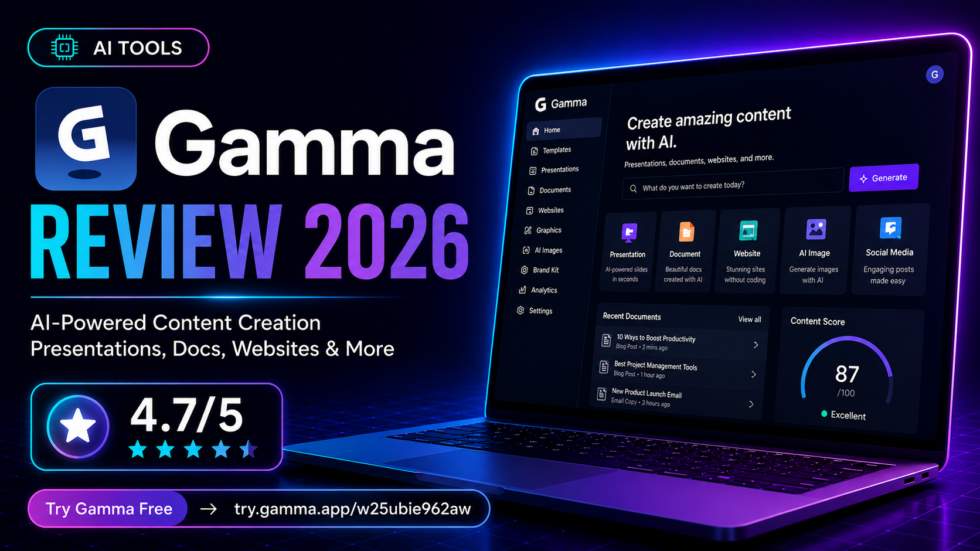
Gamma Review 2026: Features, Pricing, Pros & Cons
Read our Gamma review 2026 to explore its AI presentation maker, features, pricing, pros, cons, alternatives, and whether Gamma is worth it.
URL Slug: /gamma-review/
Creating a professional presentation used to mean spending hours writing slides, choosing layouts, finding images, and manually adjusting every visual element.
Gamma takes a different approach.
Gamma is an AI-powered visual content platform that can turn a prompt, outline, or existing file into presentations, documents, websites, social media content, and graphics.
Its biggest appeal is speed: instead of starting from a blank slide, users can give Gamma an idea and let AI build an initial structure and visual design that can then be edited, branded, shared, or exported.
Gamma now supports more than presentation creation. Its official product lineup includes presentations, websites, documents, social media, graphics, and an API for programmatic content generation.
So, is Gamma actually worth using in 2026?
This Gamma review covers its key features, AI capabilities, pricing structure, advantages, limitations, ideal users, and alternatives.
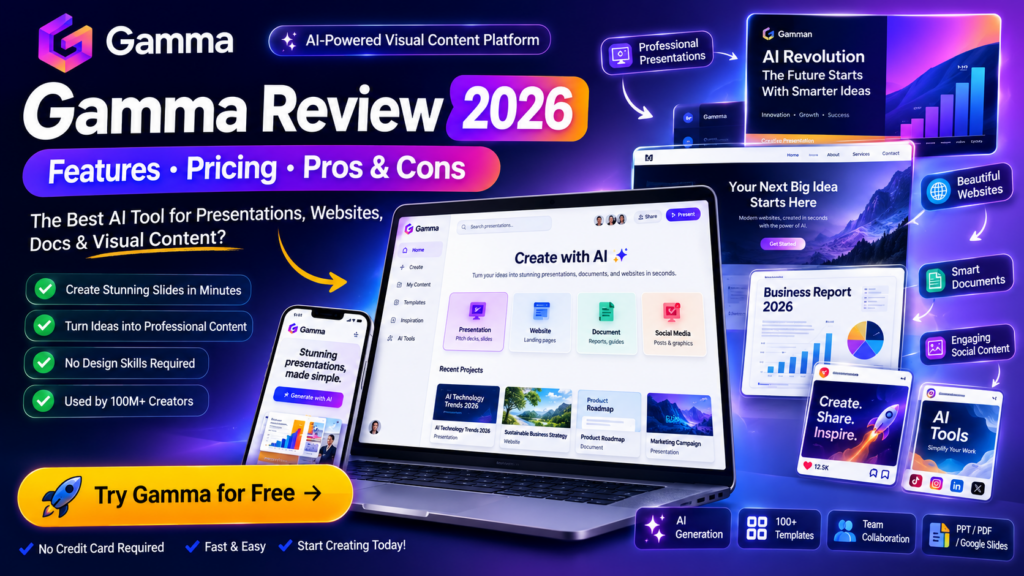
Gamma Review: Quick Verdict
Best For: Presentations, pitch decks, reports, educational content, visual documents, and fast content creation
Main Strength: Turns ideas and existing content into polished visual content quickly
Main Limitation: AI-generated presentations often still benefit from human editing and fact-checking
Free Plan: Yes
Paid Plans: Plus, Pro, and Ultra, with additional options for organizations
Exports: PowerPoint, PDF, PNG, and Google Slides are supported
Overall Verdict: Gamma is particularly compelling for users who value speed and design automation. It can dramatically reduce the work required to create a strong first draft of a presentation, document, or visual project.
What Is Gamma?
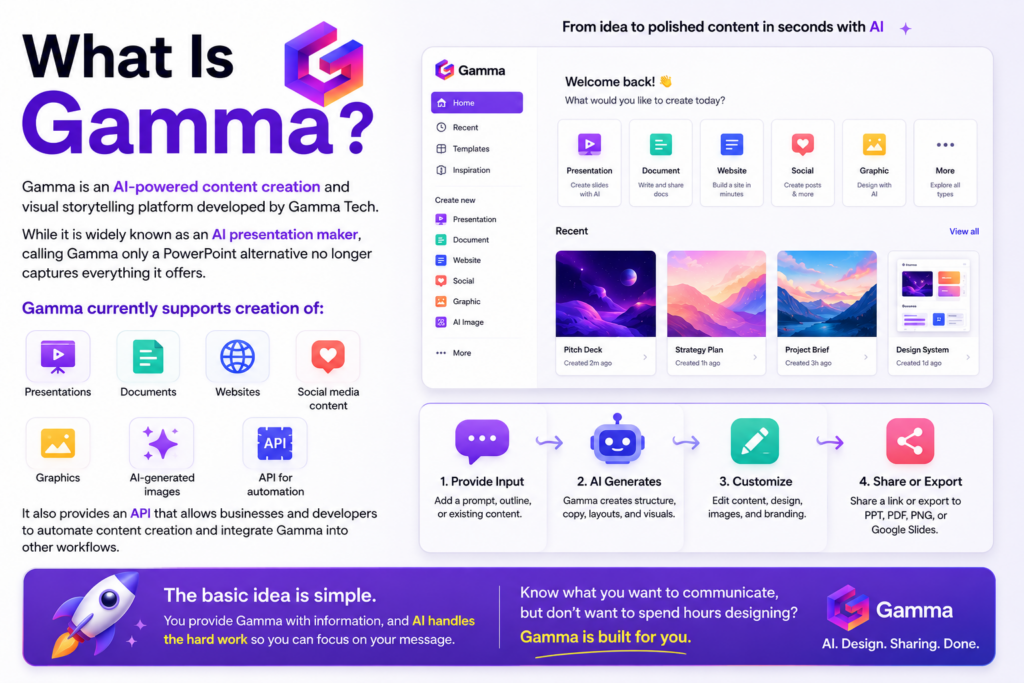
Gamma is an AI-powered content creation and visual storytelling platform developed by Gamma Tech.
While it is widely known as an AI presentation maker, calling Gamma only a PowerPoint alternative no longer captures everything it offers.
Gamma currently supports creation of:
- Presentations
- Documents
- Websites
- Social media content
- Graphics
- AI-generated images
It also provides an API that allows businesses and developers to automate content creation and integrate Gamma into other workflows.
The basic idea is simple.
Instead of manually designing every slide or page, you provide Gamma with information such as a prompt, outline, or existing content.
Gamma then uses AI to help generate the structure, copy, layouts, and visuals.
This makes it particularly useful when you know what you want to communicate but don’t want to spend hours designing it.
How Does Gamma Work?
Gamma’s workflow can be summarized as:
Idea → Generate → Edit → Brand → Share or Export
1. Start With Your Content
Gamma allows you to begin with an idea, paste an outline, or import existing material.
This means you don’t necessarily need to write an entire presentation before opening the platform.
You can provide the core idea and use AI to help develop it.
2. Generate With AI
Gamma analyzes your input and creates a structured visual project.
Depending on what you’re making, this may include:
- Headings
- Supporting copy
- Cards
- Visual hierarchy
- Images
- Layouts
- Sections
Gamma says its creation environment provides access to more than 20 AI models, although access to particular models can depend on the subscription tier.
3. Customize the Result
The initial AI output isn’t the end of the process.
You can modify the content, change layouts, generate or edit images, translate material, and apply themes.
Gamma also supports real-time collaboration.
4. Share or Export
Once finished, projects can be shared directly or exported.
Gamma currently supports exporting to:
PPT, PDF, PNG, and Google Slides.
Projects can also be published as websites or shared through links.
This flexibility is one reason Gamma works for users who still need compatibility with traditional presentation workflows.
Gamma Key Features
AI Presentation Maker
The AI presentation generator remains one of Gamma’s most recognizable features.
You provide a topic or source material, and Gamma helps build a presentation around it.
This can remove several time-consuming steps from traditional slide creation:
Planning → Writing → Layout → Design → Visual Selection
Rather than replacing the user’s judgment, Gamma is most useful for producing a strong first version that can then be refined.
Why It Matters
If you regularly produce presentations, proposals, reports, educational material, or internal decks, even reducing the first-draft process by a meaningful amount can save considerable time.
AI-Powered Design
One of Gamma’s biggest advantages is that users don’t need advanced design skills to create visually structured material.
Gamma automatically helps organize content into visual layouts rather than presenting users with an empty canvas.
This makes it especially approachable for:
- Students
- Educators
- Marketers
- Consultants
- Founders
- Sales teams
- Content creators
You can then customize the generated design rather than building everything from scratch.
AI Image Generation
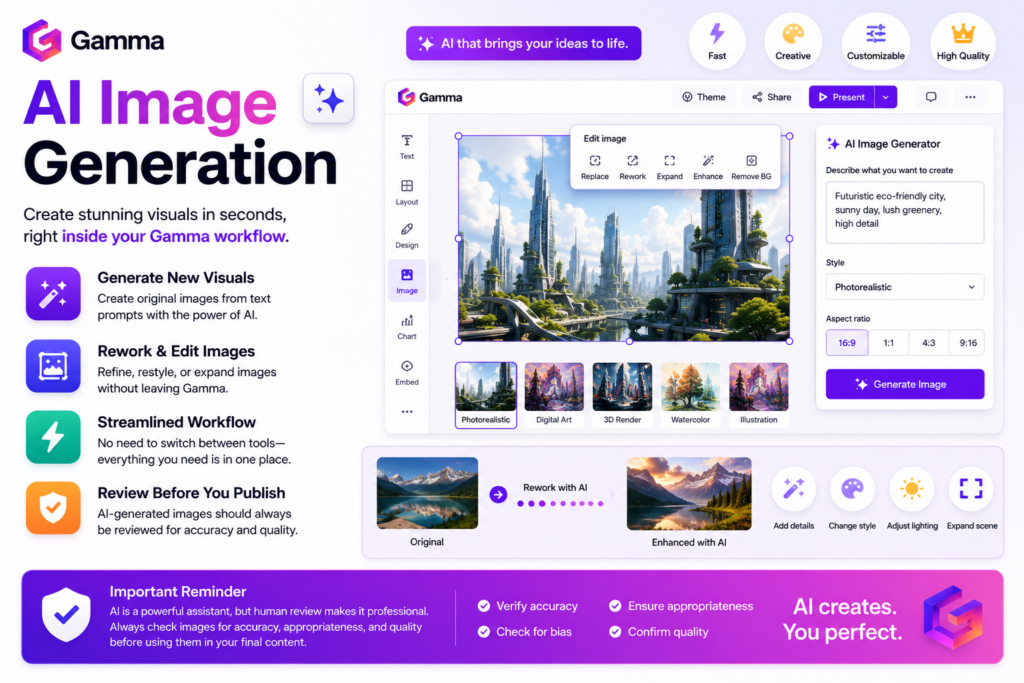
Gamma integrates AI image generation into its content workflow.
Users can generate new visuals and rework images using AI while editing their content.
This can reduce the need to constantly switch between Gamma and a separate image-generation platform.
However, generated images should still be reviewed carefully before professional publication.
AI Editing
Gamma’s AI capabilities continue after the initial generation.
Users can use AI to reshape content, modify layouts, generate visuals, and translate material.
This creates a more iterative workflow:
Generate → Review → Ask AI to Improve → Manually Refine
That is often more useful than treating AI generation as a one-click finished product.
Gamma Presentations
Presentations are arguably Gamma’s strongest use case.
Gamma can transform an idea into a structured slide deck and lets users export the finished result into familiar formats.
The Free plan currently supports generating up to 10 slides per prompt, while paid tiers increase available capabilities.
For users who frequently create:
- Pitch decks
- Sales presentations
- Marketing decks
- Classroom presentations
- Training material
- Business proposals
- Project reports
Gamma can significantly accelerate the initial creation process.
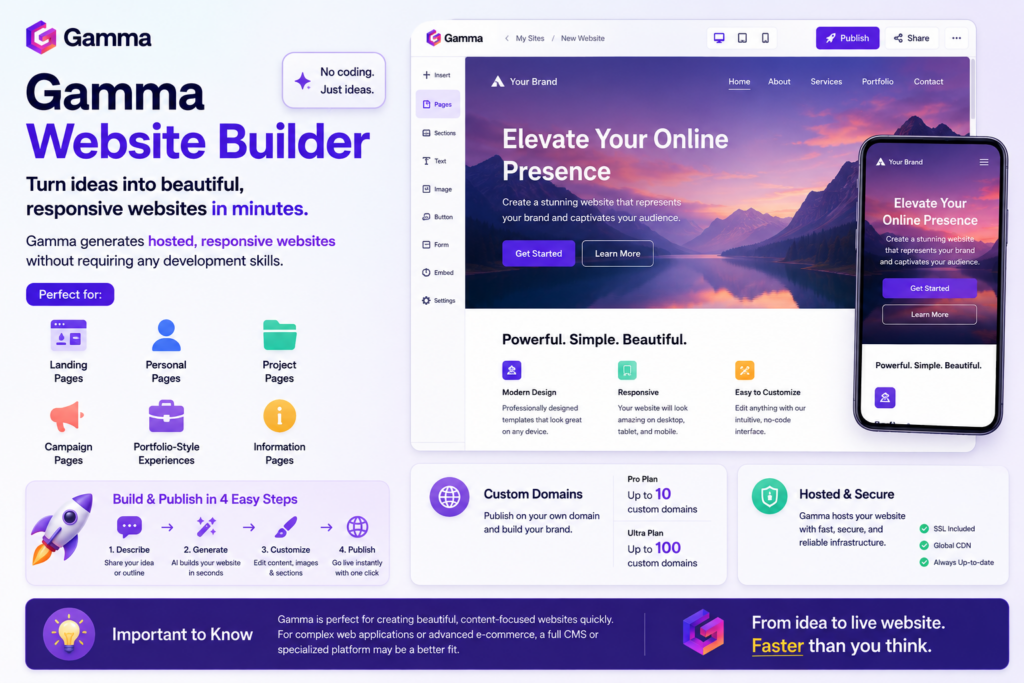
Gamma Website Builder
Gamma isn’t limited to slides.
The platform can generate hosted, responsive websites without requiring traditional development skills.
This can work well for simple:
- Landing pages
- Personal pages
- Project pages
- Campaign pages
- Portfolio-style experiences
- Information pages
Pro users can currently publish up to 10 custom domains, while Ultra increases this to 100 custom domains.
Gamma shouldn’t automatically be viewed as a replacement for a full CMS or sophisticated e-commerce platform, but it can be appealing when speed matters more than deep development flexibility.
Gamma Documents
Gamma can also create visual documents.
Instead of producing a traditional text-heavy document, users can create structured visual material such as:
- Reports
- White papers
- One-pagers
- Proposals
- Guides
This is particularly useful when the document will be presented to clients or stakeholders and visual presentation matters.
Gamma Social Media & Graphics
Gamma has expanded into social content and graphics.
Its social media tools can generate platform-ready visual content, while its graphics functionality can create and edit branded visuals such as illustrations and infographics.
This expansion makes Gamma increasingly relevant as a broader AI design and visual communication platform, rather than just a presentation generator.
Gamma API
For advanced workflows, Gamma provides an API.
The API is designed to let organizations:
- Generate content programmatically
- Automate content production
- Integrate Gamma with existing software
- Scale repetitive content workflows
API access is currently listed as part of Gamma Pro.
For individual presentation creators, this probably won’t matter.
For businesses creating large volumes of standardized content, it could be significantly more valuable.
Gamma Pricing 2026
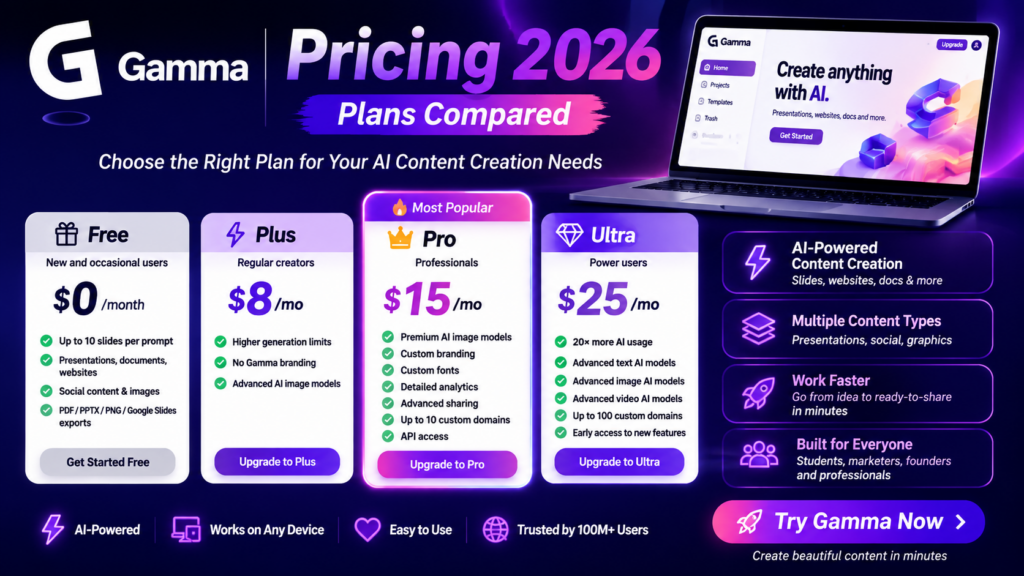
Gamma currently organizes its individual offering into four main tiers:
| Plan | Best For | Key Positioning |
|---|---|---|
| Free | New and occasional users | Basic creation and testing |
| Plus | Regular creators | More AI power and no Gamma branding |
| Pro | Professionals | Premium AI, branding, analytics and API |
| Ultra | Power users | Highest AI usage and advanced models |
Gamma also provides organization-focused options.
Because Gamma offers monthly and annual billing and its pricing display can vary by billing selection and region, users should check the live pricing page before purchasing rather than relying on an older static price.
Gamma Free
The Free plan is surprisingly useful for testing the platform.
It currently includes:
- Up to 10 slides per prompt
- Presentations
- Documents
- Websites
- Social content
- Images
- PDF and PPTX imports
- PDF exports
- PPTX exports
- PNG exports
- Google Slides exports
No credit card is required to start.
Who Is Free Best For?
Free is ideal if you’re evaluating Gamma or only occasionally need AI-generated visual content.
Gamma Plus
Plus is designed for users who need more AI capability and want to remove Gamma branding.
Current highlights include:
- Everything in Free
- Higher generation limits
- Gamma branding removal
- Advanced AI image models
Gamma’s live pricing page currently lists up to 75 slides per prompt for Plus, although Gamma’s limits and product packaging have changed over time, so current account limits should always be checked before subscribing.
Gamma Pro
Pro targets professionals who need deeper customization.
It currently adds features including:
- Premium AI image models
- Custom branding
- Custom fonts
- Detailed analytics
- Advanced sharing
- Up to 10 custom domains
- API access
- Workspace templates
Who Should Choose Pro?
Pro makes more sense for consultants, marketers, agencies, founders, and businesses using Gamma as part of their regular professional workflow.
Gamma Ultra
Ultra is Gamma’s high-end individual tier.
Gamma positions it as offering 20× more AI usage and access to its most advanced models.
It includes everything in Pro plus:
- Advanced text AI models
- Advanced image AI models
- Advanced video AI models
- Up to 100 custom domains
- Early access to new features
Ultra is therefore aimed more at heavy AI users than someone creating a presentation every few weeks.
Gamma Pros and Cons
Pros
Extremely Fast First Drafts
Gamma can dramatically reduce the amount of time required to move from an idea to something presentable.
Easy to Use
You don’t need to be an experienced designer to get started.
More Than Presentations
Presentations, documents, websites, graphics, social content, and API functionality make Gamma considerably broader than a simple slide generator.
Strong Export Options
Support for PowerPoint, PDF, PNG, and Google Slides is important for users who still work in traditional ecosystems.
AI Image Capabilities
Integrated image generation makes the creation workflow more convenient.
Free Plan Available
Users can evaluate Gamma without providing a credit card.
Collaboration
Real-time collaboration makes Gamma useful for teams rather than just individual creators.
Cons
AI Content Still Requires Review
AI-generated copy can contain weak wording, repetition, oversimplification, or factual errors.
Professional content should be reviewed before publication or presentation.
Less Manual Control Than Traditional Design Tools
Users who want pixel-level control over every element may still prefer dedicated presentation or design software.
Best AI Features Require Paid Plans
Premium models, advanced customization, API access, and higher usage are tied to paid subscriptions.
AI Design Can Feel Formulaic
AI-generated layouts can sometimes feel templated if users accept the first output without customization.
Who Should Use Gamma?
Students and Educators
Gamma can make it much faster to transform research, notes, or lesson material into visual presentations.
AI-generated factual information should still be checked against reliable sources.
Marketers
Marketers can use Gamma for:
- Campaign presentations
- Strategy decks
- Reports
- Social content
- Landing pages
- Visual documents
Consultants
Consultants frequently need to transform complicated ideas into polished client-facing presentations.
Gamma’s combination of speed and visual design is well suited to this workflow.
Founders and Startups
Founders can use Gamma for pitch decks, internal presentations, project pages, proposals, and early website concepts.
Sales Teams
Sales professionals can create proposals, decks, and supporting visual material more quickly.
Content Creators
The addition of graphics and social media creation makes Gamma increasingly useful beyond traditional presentations.
Who Should Not Use Gamma?
Gamma may not be the ideal choice if:
- You require extremely precise manual layout control.
- Your organization has strict PowerPoint-only workflows.
- You only create presentations occasionally and already have an efficient workflow.
- You need complex web applications rather than simple generated websites.
- You expect AI to produce factually perfect content without review.
Design automation is Gamma’s strength, but automation naturally means giving up some manual control.
Is Gamma Safe?
Gamma states that it is a SOC 2 Type II compliant organization.
It also says projects are private by default, with users controlling whether projects are shared with specific people, a team, or publicly.
There is an important AI-data distinction worth knowing.
Gamma says content in Team and Business workspaces is automatically excluded from AI training. For individual Free, Plus, Pro, and Ultra workspaces, content may be used for training AI features by default, but users can opt out through account settings.
Businesses working with confidential information should therefore review Gamma’s current privacy, security, and data-processing policies before uploading sensitive material.
Is Gamma Legit?
Yes, Gamma is an established commercial software platform operated by Gamma Tech, Inc.
Its official website currently states that more than 100 million users are using the platform, although this is a company-reported figure rather than an independently audited metric.
Gamma publicly provides pricing information, help documentation, legal policies, security information, developer documentation, and product documentation.
For prospective users, the existence of a free tier also makes it possible to evaluate the product before deciding whether a paid subscription makes sense.
Gamma Alternatives
Canva
Canva is a strong alternative for users who prioritize broad graphic design capabilities, templates, social media design, and manual visual control.
Gamma is more focused on quickly transforming ideas and information into structured visual content.
Microsoft PowerPoint
PowerPoint remains a better fit when compatibility, granular slide editing, offline workflows, and traditional presentation standards are the priority.
Gamma has an advantage when speed and AI-assisted generation matter more.
Google Slides
Google Slides remains attractive for straightforward presentations and familiar browser-based collaboration.
Gamma offers considerably more AI-driven generation and visual automation.
Beautiful.ai
Beautiful.ai is another presentation-focused option built around automated design.
Users comparing it with Gamma should consider whether they primarily need presentations or Gamma’s broader combination of presentations, websites, documents, social media, graphics, and API functionality.
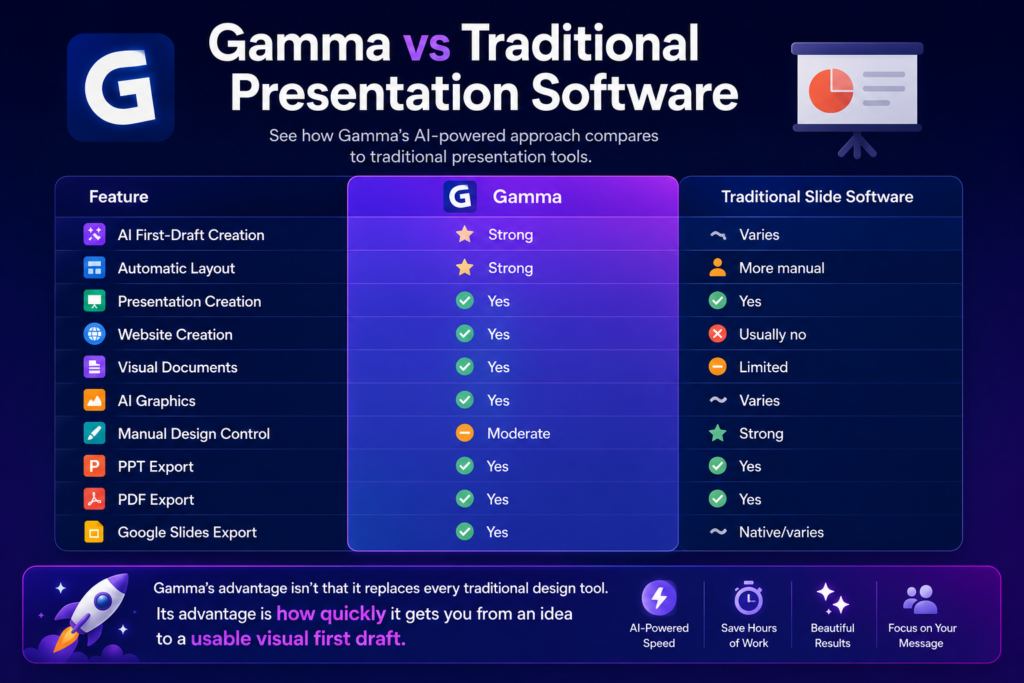
Gamma vs Traditional Presentation Software
| Feature | Gamma | Traditional Slide Software |
|---|---|---|
| AI First-Draft Creation | Strong | Varies |
| Automatic Layout | Strong | More manual |
| Presentation Creation | Yes | Yes |
| Website Creation | Yes | Usually no |
| Visual Documents | Yes | Limited |
| AI Graphics | Yes | Varies |
| Manual Design Control | Moderate | Strong |
| PPT Export | Yes | Yes |
| PDF Export | Yes | Yes |
| Google Slides Export | Yes | Native/varies |
Gamma’s advantage is not that it replaces every traditional design tool.
Its advantage is how quickly it gets you from an idea to a usable visual first draft.
Is Gamma Worth It in 2026?
For many users, yes—especially if creating presentations and visual content is a regular part of your work.
Gamma delivers the most value when you frequently face a blank page and need to turn raw information into something structured and visually appealing.
Its workflow can remove much of the repetitive work associated with:
- Structuring slides
- Choosing layouts
- Finding visuals
- Formatting content
- Applying design systems
- Preparing first drafts
The Free plan also reduces the barrier to testing whether this workflow actually saves you time.
Paid plans become more compelling when you need higher AI usage, premium models, branding removal, analytics, custom domains, API access, or more advanced customization.
For someone who creates one basic presentation every few months, upgrading may be unnecessary.
For marketers, consultants, founders, educators, sales teams, agencies, and frequent presentation creators, Gamma can become a significant productivity tool.
Frequently Asked Questions
What is Gamma AI?
Gamma is an AI-powered visual content platform for creating presentations, documents, websites, graphics, and social media content.
Is Gamma free?
Yes. Gamma offers a Free plan, and its current pricing page says no credit card is required to start.
Can Gamma create PowerPoint presentations?
Gamma can create presentations and export projects to PPTX for use with PowerPoint.
Can Gamma export to Google Slides?
Yes. Google Slides is currently one of Gamma’s supported export options.
Can Gamma build websites?
Yes. Gamma can generate hosted, responsive websites without requiring traditional development.
Does Gamma have AI image generation?
Yes. Gamma supports AI-generated images and AI-assisted image editing as part of its creation workflow.
Does Gamma have an API?
Yes. Gamma offers API functionality for programmatic content creation and integrations. API access is currently listed under Pro.
Is Gamma good for students?
Gamma can be useful for turning notes, research, and ideas into visual presentations. Students should still verify AI-generated factual content against reliable academic sources.
Is Gamma good for business?
Gamma can be particularly useful for business presentations, proposals, reports, websites, and collaborative content creation. It also offers Team and Business options with organization-oriented features.
Can I cancel Gamma?
Gamma supports monthly subscriptions, and its help documentation says users can cancel before the next billing date to avoid another monthly charge.
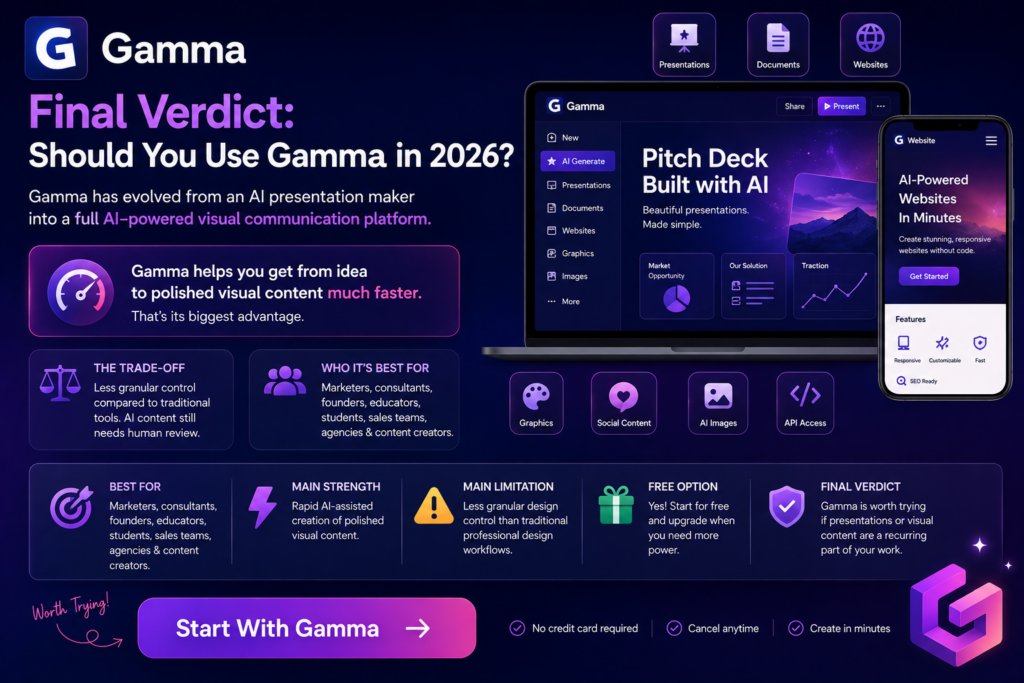
Final Verdict: Should You Use Gamma in 2026?
Gamma has evolved from an AI presentation maker into a broader AI-powered visual communication platform.
Its strongest advantage remains straightforward:
Gamma helps you get from idea to polished visual content much faster.
Presentations are still one of its best use cases, but websites, documents, graphics, social content, AI images, collaboration, analytics, and API access significantly expand what can be done within the platform.
The trade-off is control.
Professional designers and advanced PowerPoint users may prefer tools that allow more granular manual customization. AI-generated content also needs human review rather than being published blindly.
But for users who prioritize speed, ease of use, AI assistance, and professional-looking first drafts, Gamma is one of the more compelling options to evaluate.
Best For: Marketers, consultants, founders, educators, students, sales teams, agencies, and content creators.
Main Strength: Rapid AI-assisted creation of polished visual content.
Main Limitation: Less granular design control than traditional professional design workflows.
Free Option: Yes.
Final Verdict: Gamma is worth trying if presentations or visual content are a recurring part of your work, particularly because you can evaluate the core experience on the Free plan before upgrading.
SEO Package
Primary Keyword: Gamma Review
Secondary Keywords: Gamma AI, Gamma App, Gamma AI Review, Gamma Pricing, Gamma Presentation Maker, Gamma AI Presentation Maker, Gamma Features, Gamma Alternatives, Gamma Free
Long-Tail Keywords: Gamma Review 2026, Is Gamma AI Free, Is Gamma Worth It, Is Gamma Safe, Is Gamma Legit, How Much Does Gamma Cost, Gamma AI Presentation Review, Gamma vs PowerPoint, Gamma vs Canva, Best Gamma Alternatives
Search Intent: Commercial Investigation + Informational
SEO Title: Gamma Review 2026: Features, Pricing, Pros & Cons
Meta Description: Read our Gamma review 2026 to explore its AI presentation maker, features, pricing, pros, cons, alternatives, and whether Gamma is worth it.
Suggested Internal Articles: Best AI Presentation Makers, Best AI Tools for Students, Best AI Tools for Business, Best AI Design Tools, Gamma Alternatives, Gamma vs Canva, Gamma vs PowerPoint, Best AI Website Builders.
Recommended Schema: SoftwareApplication, Review, BreadcrumbList. Avoid adding an invented AggregateRating.
Official sources used: Gamma Official Website and Gamma Pricing. Product capabilities, plan structure, exports, security status and current feature information were verified against Gamma’s official pages and Help Center.