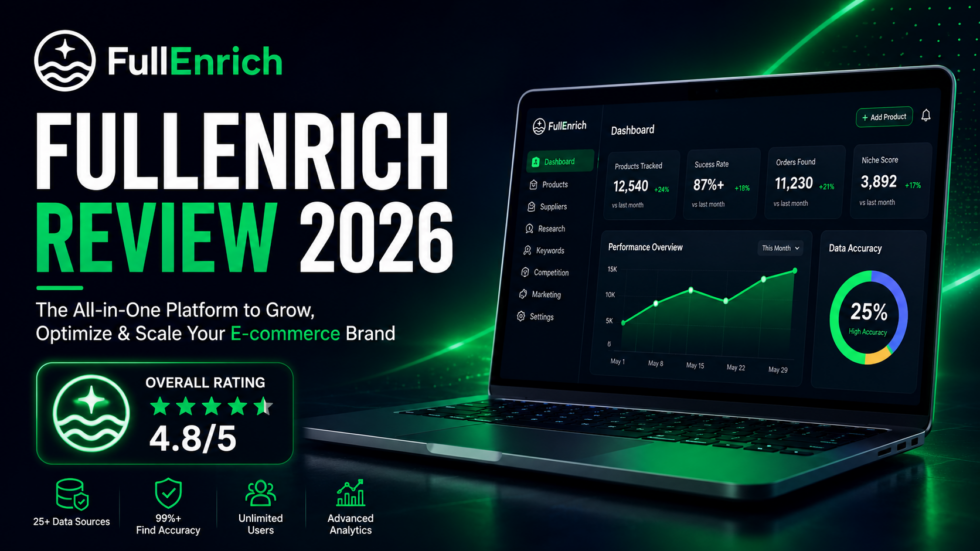
A prospect list with 10,000 names is not particularly valuable if your sales team can only reach half of them.
That is the problem FullEnrich is trying to solve.
Instead of building another standalone B2B contact database, FullEnrich connects multiple data providers into a waterfall enrichment system. When one source fails to find a prospect’s contact information, FullEnrich moves to another source, then another, until it finds a verified result or exhausts its available sources.
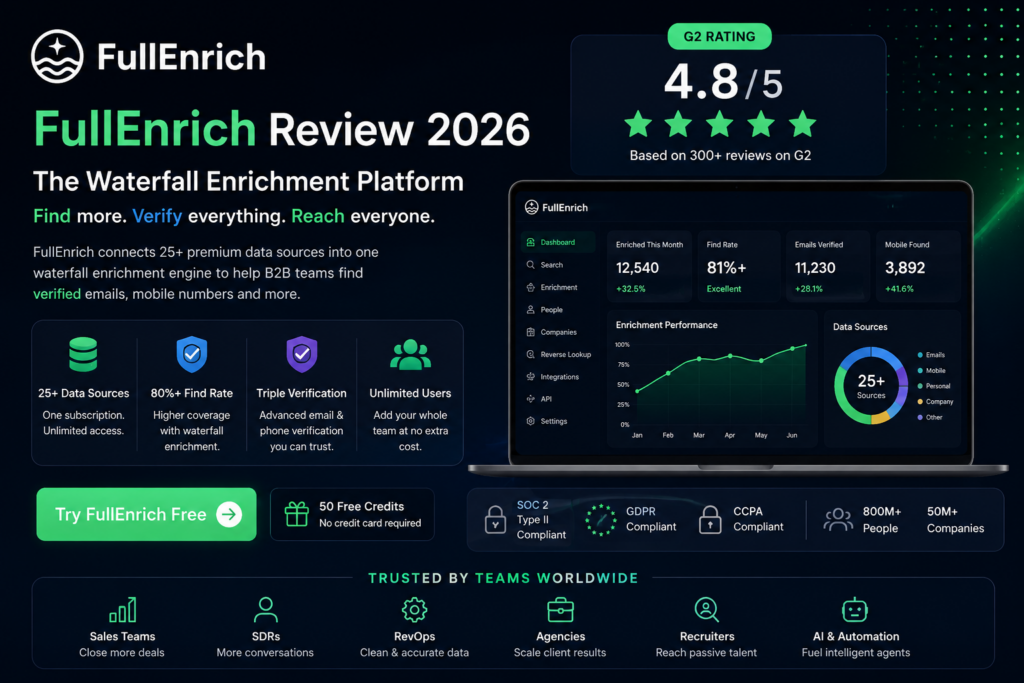
FullEnrich currently advertises 80%+ enrichment find rates, while its pricing page describes a waterfall that checks 25+ data sources. It can search for work emails, personal emails, mobile numbers, company data, and other B2B information.
That sounds attractive on paper.
But the real question is:
Does FullEnrich actually make more sense than subscribing to Apollo, Lusha, Hunter, or several enrichment tools separately?
This FullEnrich review looks at the platform from that perspective.
FullEnrich Review — Quick Scorecard
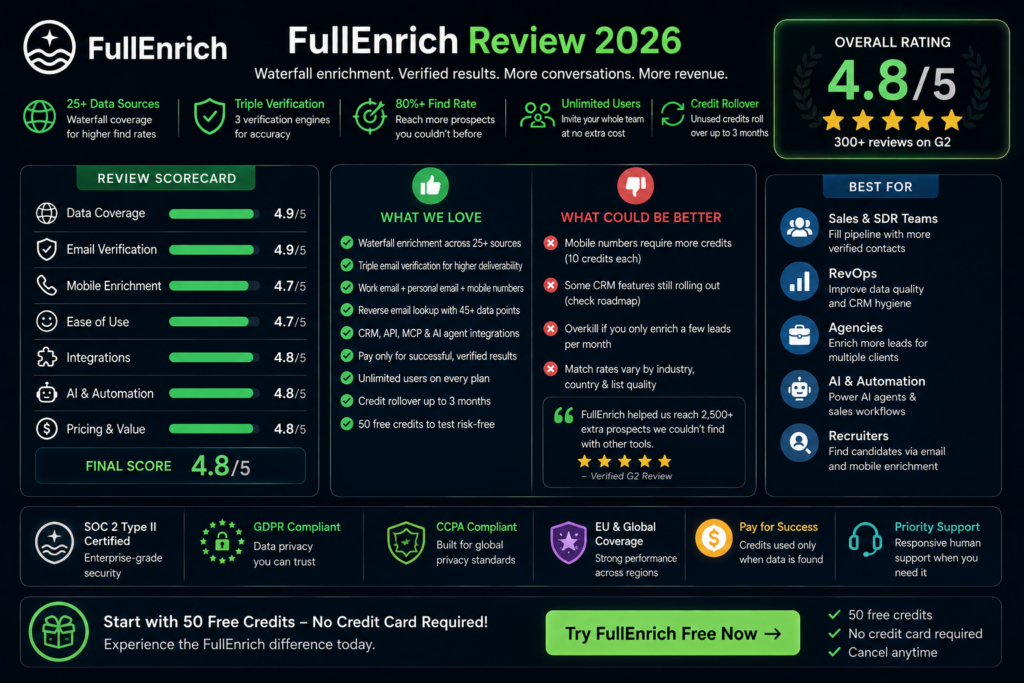
| Category | Rating |
|---|---|
| Data Coverage | 4.9/5 |
| Email Verification | 4.9/5 |
| Mobile Enrichment | 4.7/5 |
| Ease of Use | 4.7/5 |
| Integrations | 4.8/5 |
| AI & Automation | 4.8/5 |
| Pricing Flexibility | 4.8/5 |
| Overall Score | 4.8/5 |
Best for: SDR teams, RevOps, B2B agencies, recruiters, GTM teams, SaaS businesses and AI-powered sales workflows.
👉 Test FullEnrich With 50 Free Credits
The Problem FullEnrich Is Built to Solve
Most contact-data platforms suffer from one unavoidable weakness:
No single database has every prospect.
A provider may have excellent US coverage but perform poorly in parts of Europe.
Another may find professional emails reliably but return fewer direct mobile numbers.
A third may have information that neither of the first two providers has.
This creates an awkward workflow for outbound teams.
You search one tool.
No result.
You open another platform.
Still nothing.
You try a third service.
Then you run the email through another verification tool.
At small scale, this is annoying.
At thousands of prospects per month, it becomes an operational problem.
FullEnrich was built around the idea that the sales team should not have to manage this process manually.
What Is FullEnrich?
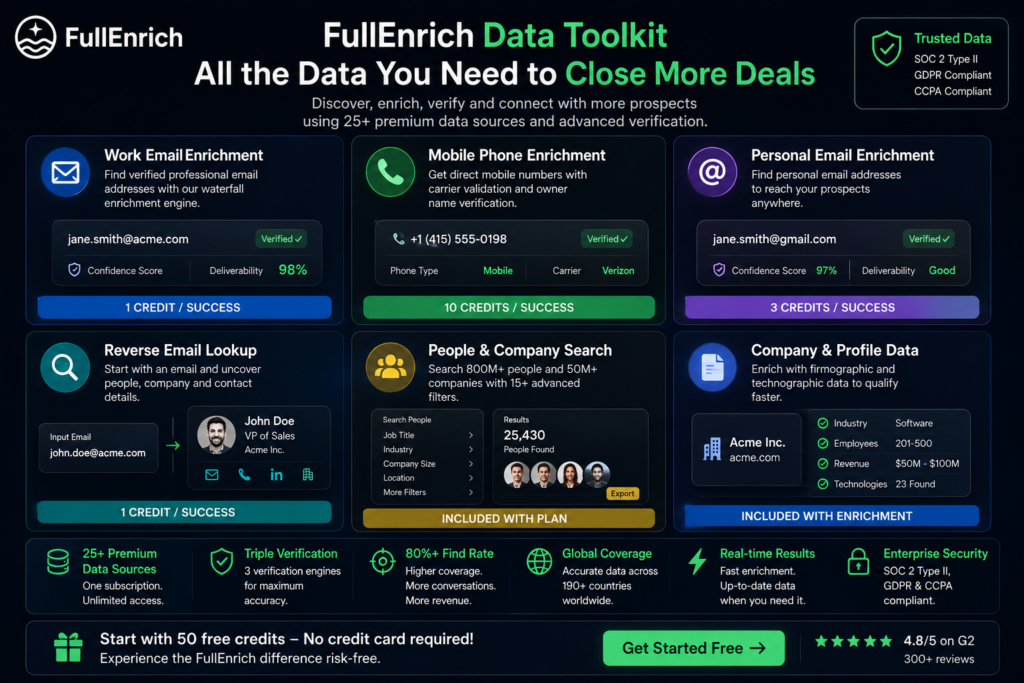
FullEnrich is a B2B waterfall enrichment platform for finding and verifying contact information.
Rather than relying on one database, the service searches a network of data providers.
FullEnrich’s current pricing page lists 25+ sources inside its waterfall enrichment system.
Its primary outputs include:
- Verified work emails
- Personal email addresses
- Mobile phone numbers
- Person information
- Company information
- Reverse email lookup results
FullEnrich also provides prospect and company search, APIs, CRM integrations and AI-agent integrations.
So although contact enrichment remains the core product, it is increasingly positioned as a broader B2B data layer for sales and revenue workflows.
The Feature That Makes FullEnrich Different: Waterfall Enrichment
This is the most important part of the review.
If you understand waterfall enrichment, you understand why FullEnrich exists.
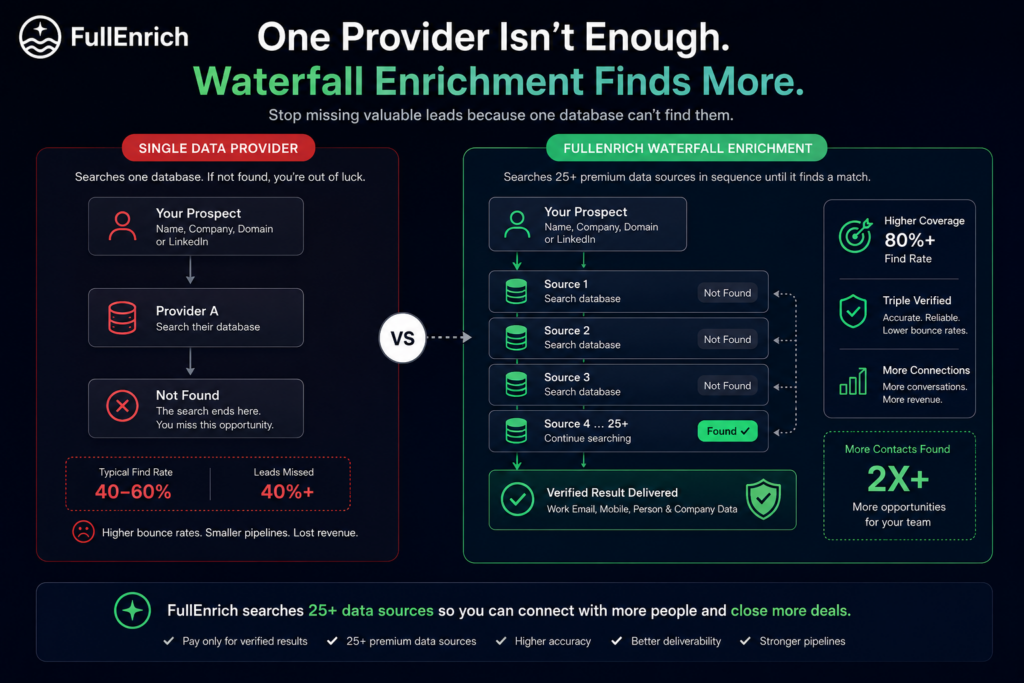
A traditional enrichment workflow looks like this:
Lead → Provider A → Found / Not Found
If the provider cannot identify the email or phone number, the process ends.
FullEnrich works more like:
Lead
↓
Data Source A
Not found?
↓
Data Source B
Still nothing?
↓
Data Source C
↓
Continue Through the Waterfall
↓
Verified Result
The process continues across multiple sources until FullEnrich finds a usable match.
FullEnrich says a typical single-source provider may find approximately 40–60% of a B2B contact list, whereas its waterfall approach can reach roughly 80% or higher on typical lists. These figures are FullEnrich’s own published estimates, so actual performance will depend on your market and lead list.
Why this matters
Suppose your campaign contains 10,000 qualified prospects.
A 55% match rate gives you approximately:
5,500 contacts
An 80% match rate gives you:
8,000 contacts
That is 2,500 additional prospects your sales workflow can potentially reach.
For high-value B2B sales, contact coverage is therefore not a minor feature.
It can directly affect the usable size of your pipeline.
What I Like About FullEnrich’s Approach
The waterfall itself is useful, but the more interesting part is what happens around it.
FullEnrich doesn’t simply return the first piece of raw data it sees.
Its enrichment workflow incorporates verification before information reaches the user. The company says roughly 30% of raw data can be removed during its verification process, illustrating how much questionable information can exist across B2B data sources.
This creates a useful distinction:
More data isn’t necessarily better.
The goal should be:
More usable data.
That is where FullEnrich’s combination of waterfall sourcing and verification becomes more compelling.
Email Enrichment: More Than Finding an Address
Work-email discovery is probably the most common FullEnrich use case.
You can provide information such as a prospect’s name, company/domain or LinkedIn URL and attempt to retrieve a professional email address along with additional profile information.
But the interesting part is verification.
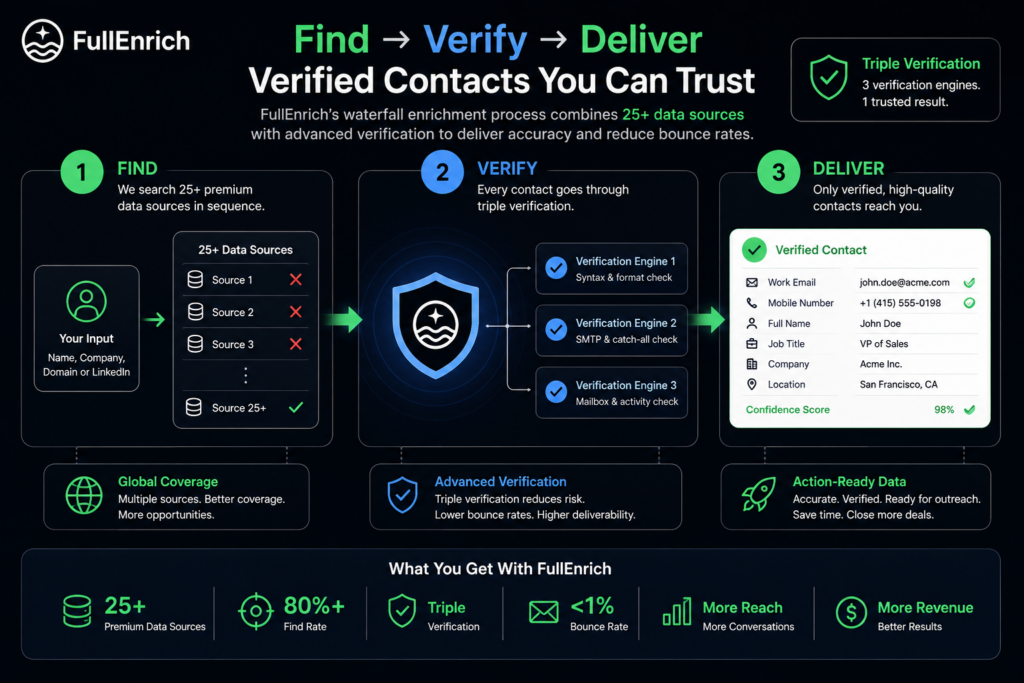
FullEnrich’s current product material describes several verification layers, including:
- Syntax and formatting checks
- SMTP checks
- Catch-all verification
- Confidence scoring
- Additional email verification
The company describes its process as triple email verification and says this can reduce bounce rates to below 1% in its waterfall workflow.
That matters because a bad enrichment platform can create a second problem after solving the first.
Finding an address is useful.
Sending thousands of emails to invalid addresses is not.
Catch-All Email Verification
Catch-all domains are particularly difficult for outbound teams.
A catch-all mail server may accept messages sent to many different addresses at the domain, making it harder to know whether the individual mailbox genuinely exists.
FullEnrich’s pricing page currently states that its verification system can verify around 80% of catch-all addresses.
This is a useful feature for teams where deliverability matters.
Rather than treating every catch-all email as equally safe or equally risky, additional verification can create better filtering before data enters an outreach sequence.
Mobile Phone Enrichment
Email isn’t FullEnrich’s only major use case.
The platform also searches for direct mobile numbers.
FullEnrich says its phone workflow includes validation designed to determine whether a number is a mobile phone, remove out-of-service numbers and, for the US and Canada, support owner-name verification.
This makes the tool more useful for teams running multi-channel outbound.
For example:
Email → LinkedIn → Direct Call → Follow-Up
can be significantly more flexible than an email-only campaign.
FullEnrich’s own help documentation reports mobile enrichment rates of roughly 76% in the US, 71% in EMEA and 81% in APAC. These are vendor-published figures rather than an independent benchmark, so results should be tested against your own prospect list.
Personal Email Enrichment
FullEnrich can also search for personal email addresses.
This may be particularly relevant to approved recruiting or other legitimate B2B workflows where a work inbox is not the ideal contact channel.
FullEnrich’s recruiting material specifically positions personal email and mobile enrichment as a way to reach candidates independently of their current employer’s email domain.
Personal email enrichment costs more credits than professional-email enrichment, which we’ll cover in the pricing section.
Reverse Email Lookup Is Surprisingly Useful
Reverse email lookup flips the enrichment process around.
Instead of:
Person → Email
you start with:
Email → Person
FullEnrich says its reverse-email system can return information including:
- Full name
- Job title
- Company
- Mobile phone
- LinkedIn profile
- Location
- Additional emails
- Company information
The dedicated reverse-lookup page describes 45+ possible data points returned from one email address.
This creates some interesting use cases.
Imagine an inbound form only contains:
A sales team may know almost nothing about the person.
Reverse enrichment can potentially turn that single address into a much more useful lead record.
Useful for:
- Inbound lead qualification
- CRM cleanup
- Demo requests
- Newsletter leads
- Event registrations
- Existing database enrichment
For RevOps teams, this feature can be nearly as valuable as outbound prospect enrichment.
FullEnrich Is Also Becoming a Prospecting Database
Another change worth mentioning is that FullEnrich now goes beyond enriching lists you already have.
Its pricing page lists access to:
800M people
and
50M companies
along with more than 15 search filters for people and companies.
Users can create prospect lists, export them to CSV, exclude people already enriched and upload lists of companies or domains.
That puts FullEnrich into partial competition with traditional sales-intelligence databases.
The workflow becomes:
Find Prospects → Enrich Contacts → Verify Data → Push to CRM
rather than:
Bring Your Own Prospect List → Enrich
That makes the platform more complete.
Where FullEnrich Fits Into a Modern Sales Stack
FullEnrich becomes much more useful when it doesn’t operate as an isolated tool.
A typical outbound technology stack might contain:
LinkedIn / Prospect Database
↓
FullEnrich
↓
CRM
↓
Sales Engagement Platform
↓
SDR
FullEnrich’s role is essentially the contact-data layer.
It takes incomplete prospect records and turns them into something sales systems can act on.
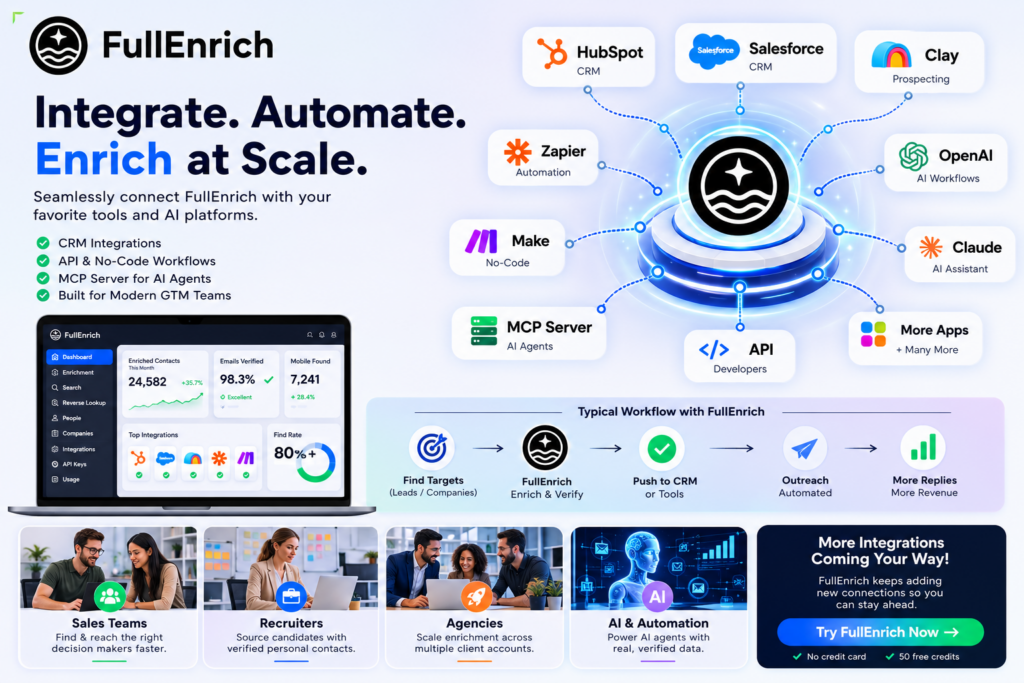
The company currently promotes integrations with systems including HubSpot, Salesforce and Clay, in addition to API-driven workflows.
FullEnrich + HubSpot
For HubSpot users, FullEnrich can push enriched information into CRM records.
That can eliminate workflows like:
- Export leads.
- Upload them into an enrichment tool.
- Download a CSV.
- Clean the spreadsheet.
- Import it back into HubSpot.
A direct integration makes the enrichment layer more useful because data can stay closer to the system sales teams already use.
FullEnrich’s current pricing page shows HubSpot integration availability, although some deeper HubSpot enrichment features are still labeled as upcoming.
FullEnrich + Salesforce
Salesforce integration is also listed.
This is particularly important for larger sales organizations where Salesforce acts as the primary system of record.
As with HubSpot, some Salesforce functionality is available while other deeper workflow capabilities are still marked as forthcoming on FullEnrich’s feature comparison.
That distinction is worth noting because users should not assume every listed CRM capability is already fully released.
FullEnrich + Clay
Clay users are an interesting audience for FullEnrich.
Clay can build custom data-enrichment waterfalls by combining multiple providers.
FullEnrich effectively offers a managed waterfall that can also sit inside a Clay workflow.
FullEnrich describes the difference as:
Clay = DIY waterfall
versus
FullEnrich = managed waterfall
The comparison comes from FullEnrich itself, but it captures the practical difference reasonably well: one gives you more control over building the provider sequence; the other aims to reduce configuration work.
FullEnrich for AI Agents
This is one of the reasons FullEnrich is more interesting in 2026 than a traditional contact database.
The platform now provides integrations aimed at AI agents.
Its integrations page currently lists:
- MCP Server
- Claude
- OpenAI
- API workflows
FullEnrich says its MCP Server gives AI agents structured access to its enrichment functions, while its OpenAI integration can bring verified contact information into GPT-powered or custom applications.
This opens up workflows such as:
AI Agent
↓
Research target account
↓
Identify relevant decision-maker
↓
Call FullEnrich
↓
Retrieve verified contact information
↓
Score / qualify prospect
↓
Push to CRM
The agent can therefore perform more of the prospect-research workflow before a human salesperson becomes involved.
FullEnrich API
Companies building internal tools or SaaS applications may prefer using the API directly.
FullEnrich currently lists:
- Enrichment API
- Search API
- Reverse Email Lookup API
across its plans.
Potential applications include:
Automatically enriching signups
A new user creates an account.
Your application sends available identity data to FullEnrich.
The returned company and contact fields help your sales team prioritize the account.
Enriching leads before assignment
Before a CRM assigns an inbound lead to a representative, FullEnrich can attempt to complete missing information.
Building sales software
A SaaS platform can use enrichment functionality as part of a larger sales workflow.
AI-driven prospecting
An agent can search, enrich and structure contact information programmatically.
This is where FullEnrich starts looking less like a standalone email finder and more like infrastructure.
Pricing: FullEnrich Uses Credits, Not Seats
This is one of the stronger parts of FullEnrich’s pricing structure.
Instead of charging every salesperson for a separate seat, FullEnrich currently provides unlimited users, including on the free tier.
Usage is mainly measured through credits.
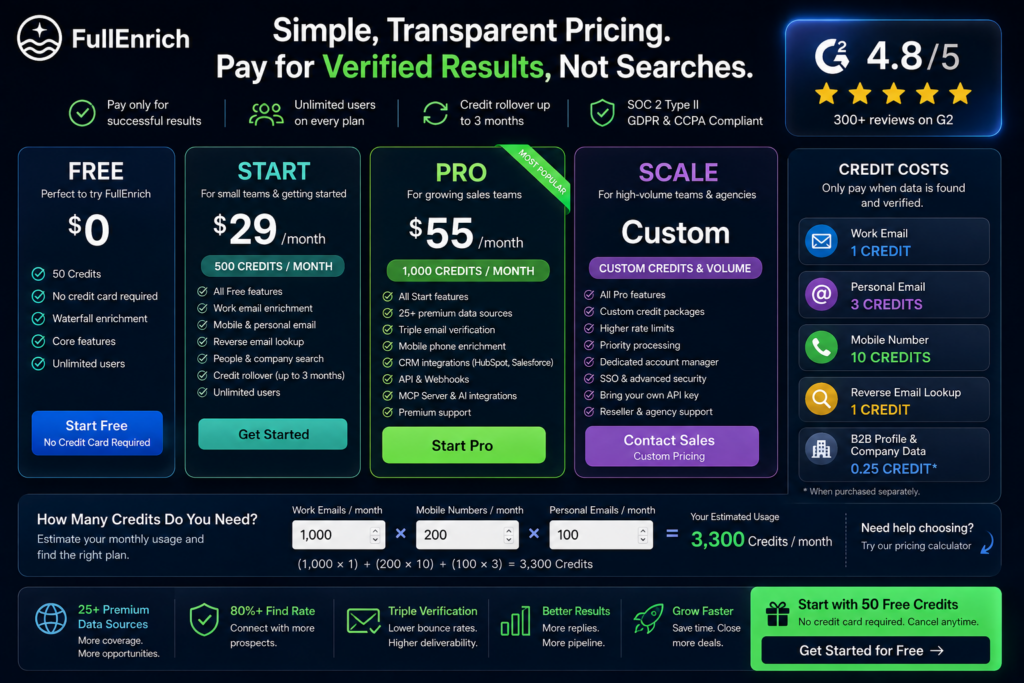
Current credit costs are:
| Enrichment Type | Credit Cost |
| Work Email | 1 credit |
| Personal Email | 3 credits |
| Mobile Number | 10 credits |
| Reverse Email Lookup | 1 credit |
| B2B Profile + Company Data | Included with enrichment |
The company’s pricing page also says standalone B2B profile/company data costs 0.25 credit when requested on its own.
This pricing structure makes phone enrichment significantly more expensive than work-email discovery.
That is worth considering when estimating monthly costs.
The Best Pricing Feature: You Pay for Successful Data
One of the most appealing aspects of FullEnrich is its success-based credit model.
FullEnrich states that failed waterfall lookups do not consume the standard enrichment credit; credits are charged when a verified match is found.
That changes the economics of prospecting.
With some systems, your team pays for:
Search attempts
With FullEnrich, the model is closer to paying for:
Successful enriched results
That is a much easier model to evaluate.
FullEnrich Plans
FullEnrich currently promotes a free starting option plus paid credit packages.
Its current content references these entry points:
Free
$0
Includes:
- 50 enrichment credits
- No credit card required
- Unlimited users
- Core enrichment functionality
Start
FullEnrich’s current material lists:
500 credits — $29/month
Pro
A commonly shown Pro configuration is:
1,000 credits — $55/month
Larger Pro credit packages scale upward; FullEnrich’s pricing calculator, for example, currently recommends a 15K-credit Pro plan at $720/month for a sample 10-person workflow consuming 12,000 credits.
Enterprise
Enterprise pricing is customized and adds capabilities intended for high-volume or more controlled deployments, including custom rate limits, priority support, account management, SSO options and bring-your-own API-key capabilities.
Because FullEnrich changes packages and volume options, always check the current pricing page before making a purchasing decision.
👉 See Current FullEnrich Pricing
A Simple Cost Example
Suppose one salesperson needs each week:
- 100 work emails
- 20 mobile numbers
The credit usage would be:
100 work emails = 100 credits
20 mobile numbers = 200 credits
Total:
300 credits per week
Over four weeks:
≈1,200 credits per month
This illustrates why phone usage matters when calculating the right plan.
A team primarily enriching emails can stretch credits significantly further than one enriching every prospect with both email and mobile information.
Credit Rollover Makes the Pricing Better
Unused SaaS credits often disappear at the end of the billing period.
FullEnrich handles this more favorably.
Its current material states that unused monthly credits can roll over for up to three months.
This is particularly useful for agencies and sales organizations where prospecting volume changes from month to month.
You are less pressured to burn through credits just because the calendar is ending.
Unlimited Users Can Matter More Than It Sounds
Consider a 10-person SDR team.
With a typical $50-per-user SaaS product, that is:
$500/month before usage fees.
FullEnrich’s unlimited-user approach avoids that type of per-seat multiplication.
That makes the platform especially interesting for:
- Agencies
- Distributed SDR teams
- RevOps teams
- Multiple departments sharing one data budget
Admins can also monitor credits and, on paid plans, apply credit limits by user.
How FullEnrich Compares With a Single Data Provider
This is where I think FullEnrich makes the strongest argument for itself.
Single-provider model
Advantages
- Simple
- Often inexpensive
- Easy to understand
Weaknesses
- Coverage ceiling
- Geographic gaps
- One provider determines your data quality
FullEnrich model
Advantages
- Multiple sources
- Higher potential coverage
- Verification included
- Better geographic resilience
- One billing relationship
Weaknesses
- More expensive than a basic standalone email finder
- Credit math is more important
- Some teams may not need the additional coverage
If your prospect database is small and one provider already finds almost everybody you need, FullEnrich may not add enough value.
If you repeatedly see “not found”, the case becomes significantly stronger.
FullEnrich vs Building Your Own Waterfall
There is another choice:
Build your own.
A technically capable GTM team can combine multiple providers through tools such as Clay, APIs and automation platforms.
That provides substantial flexibility.
You can choose:
- Provider order
- Verification services
- Conditional logic
- Data fields
- Cost controls
The drawback is maintenance.
Someone has to design and operate that enrichment workflow.
FullEnrich packages much of that complexity into one service.
This creates a simple decision:
Choose DIY if:
You want maximum control over every provider and transformation.
Choose FullEnrich if:
You primarily want the final verified result without spending as much time maintaining the waterfall.
Data Security & Compliance
B2B contact information should not be treated casually.
FullEnrich’s current pricing and product pages state support for:
- GDPR compliance
- CCPA compliance
- SOC 2 Type II
These apply across its listed plans.
Businesses should still evaluate their own obligations based on jurisdiction, outreach method and how contact information is processed.
Compliance by a vendor does not automatically make every customer use case compliant.
Where FullEnrich Is Strongest
After looking across its feature set, four things stand out.
1. Waterfall Coverage
This is the reason to buy FullEnrich.
If you don’t need multi-provider coverage, many cheaper tools can find emails.
2. Verification Is Built In
Finding more contacts is only useful if the results are usable.
The additional verification layer is therefore an important part of the product rather than an optional extra.
3. Pricing Isn’t Seat-Driven
Unlimited users make FullEnrich easier to deploy across larger teams without multiplying the subscription price for every person.
4. It Fits Modern Automation
API, CRM and AI-agent integrations allow the platform to become part of an automated GTM stack rather than remain another tab sales reps need to open manually.
Where FullEnrich Could Be Better
There are also legitimate downsides.
Mobile Credits Are Expensive
At 10 credits per successful mobile lookup compared with one credit for a work email, phone-heavy workflows consume credits much faster.
Not Every CRM Feature Is Fully Available
The pricing page currently labels some deeper HubSpot and Salesforce capabilities as Soon, so users should check the exact state of the integration they need before subscribing.
It’s Overkill for Very Small Lists
If you only need 20 emails a month, the waterfall architecture probably won’t change your business.
Vendor-Published Match Rates Need Your Own Test
The advertised 80%+ find rate is compelling, but enrichment performance varies heavily by country, industry and persona.
The best test is your own list.
Fortunately, the free credits make that fairly easy.
Who I Would Recommend FullEnrich To
Strong Fit
Outbound Sales Teams
Teams regularly enriching hundreds or thousands of prospects.
RevOps
Organizations that want cleaner CRM records and centralized enrichment.
B2B Lead Generation Agencies
Multiple users can share one credit pool without individual seat fees.
International Sales Teams
Waterfall sourcing can help reduce dependence on one provider’s geographic strengths.
Recruiters
Especially workflows involving personal email and mobile enrichment where permitted.
AI & GTM Builders
Teams creating automated sales agents and enrichment pipelines.
SaaS Companies
Companies that want programmatic enrichment through an API.
Who Should Probably Skip It
FullEnrich is harder to justify if:
- You enrich very few contacts
- Email-only enrichment from your current tool already performs well
- You don’t need mobile numbers
- You aren’t doing outbound prospecting
- You don’t need CRM or API automation
In those situations, paying for broader waterfall coverage may be unnecessary.
Is FullEnrich Legit?
FullEnrich is a functioning B2B data-enrichment platform with public product documentation, integrations, security information and customer reviews.
Its website currently displays a 4.8 rating on G2 and references customers including a range of technology and B2B companies.
For prospective buyers, however, I would focus less on logos and more on one question:
How many additional verified contacts does FullEnrich find on your own prospect list?
That is the metric that ultimately determines whether the product is worth paying for.
My FullEnrich Verdict
FullEnrich solves a very specific problem well:
Single-source B2B contact databases leave too many gaps.
Rather than asking users to manually subscribe to multiple enrichment vendors, FullEnrich wraps those sources into a waterfall and adds verification on top.
That combination is the product’s real strength.
It isn’t necessarily the right tool for somebody who wants to find five email addresses occasionally.
But for a sales organization processing thousands of prospects, the economics are different.
Higher match rates can mean:
- More reachable leads
- Fewer wasted prospects
- Less manual research
- Cleaner CRM data
- More complete multi-channel outreach
And because the free plan provides 50 credits without requiring a credit card, you can benchmark it against your existing provider before committing.
Final Score: 4.8/5
Best Features
✓ Multi-provider waterfall enrichment
✓ 25+ sources listed on current pricing page
✓ Triple email verification
✓ Work + personal emails
✓ Verified mobile enrichment
✓ Reverse email lookup
✓ People and company search
✓ API + CRM integrations
✓ MCP / AI-agent integrations
✓ Unlimited users
✓ Credit rollover
✓ Pay-for-success model
Main Limitations
– Mobile enrichment uses 10× the credits of a work email
– Some CRM capabilities are still rolling out
– Small-volume users may not need a full waterfall
– Real-world match rate varies by target market
Best For
B2B sales, RevOps, SDR teams, GTM agencies, recruiters, SaaS companies and AI-powered sales automation.
The simplest way to decide?
Take a list where your existing provider failed.
Run those prospects through FullEnrich.
If it consistently finds verified contacts your current tool missed, the value proposition becomes very easy to understand.
👉 Test FullEnrich Free — 50 Credits, No Credit Card
FullEnrich FAQ
What does FullEnrich do?
FullEnrich finds and verifies B2B contact information using a waterfall of multiple data sources. It can return work emails, personal emails, mobile numbers, person data and company information.
How many data sources does FullEnrich use?
FullEnrich’s current pricing page lists 25+ sources for waterfall enrichment. Some other FullEnrich pages still use the broader wording “20+”, so the pricing page is the best current reference.
Does FullEnrich have a free trial?
Yes. The current offer provides 50 free credits and does not require a credit card.
How many credits does an email cost?
A successfully enriched work email currently costs 1 credit, while a personal email costs 3 credits.
How many credits does a mobile number cost?
A successfully enriched mobile number currently costs 10 credits.
Does FullEnrich charge for failed lookups?
FullEnrich says standard waterfall enrichment credits are charged when a verified result is successfully found rather than for an unsuccessful lookup.
Does FullEnrich integrate with HubSpot and Salesforce?
Yes, both are listed integrations, although several deeper CRM features are still marked as upcoming on the current pricing page.
Can FullEnrich work with AI agents?
Yes. FullEnrich currently provides MCP Server, Claude and OpenAI integration options in addition to APIs.
Is FullEnrich GDPR compliant?
FullEnrich states that it is GDPR and CCPA compliant and SOC 2 Type II certified.
Is FullEnrich worth it?
It is most compelling when your existing single-source provider leaves meaningful gaps in your prospect lists. Teams should use the free credits to benchmark FullEnrich against their existing provider before upgrading.
Conclusion
FullEnrich isn’t interesting because it is another email finder.
It is interesting because it attempts to remove one of the fundamental limitations of email finders:
every individual database has blind spots.
Its waterfall model searches across multiple sources, adds verification and returns the result through one interface, CRM integration or API.
For teams where contact coverage has a direct relationship with pipeline, that can be a valuable upgrade.
Overall Rating: 4.8/5